HTTP Status Code
Every HTTP response carries a 3-digit status code. It is the server’s one-line verdict on the request, and it tells the client (and every proxy, cache and retry library in between) what to do next. The semantics are defined in RFC 9110.
Background & Design#
Where the code lives#
HTTP/1.1:   HTTP/1.1 404 Not Found          ← status line: version, code, reason phrase
HTTP/2/3:   :status: 404                    ← pseudo-header, no reason phrase at all
The code is the contract and the reason phrase is only for humans. HTTP/2 and HTTP/3 dropped the reason phrase, so never write client logic that depends on the text "Not Found".
Design rules#
| Rule | Meaning |
|---|---|
3 digits, range 100–599 |
The first digit is the class. The last two digits have no structure |
| Class is mandatory knowledge | A client must understand every class, even if it doesn’t know the exact code |
Unknown code → x00 |
An unknown 499 is treated as 400 and an unknown 587 as 500, which makes the set safe to extend |
| Extensible | New codes are registered in the IANA registry, e.g. 429 (RFC 6585) and 103 (RFC 8297) |
| Interim vs final | 1xx are interim: zero or more of them may come before exactly one final 2xx–5xx |
The five classes#
| Class | Meaning | Who must act | Final? |
|---|---|---|---|
1xx Informational |
Request received, keep going | Nobody, keep waiting | No |
2xx Success |
Request accepted and processed | Nobody, done | Yes |
3xx Redirection |
Go somewhere else to finish | Client follows the Location (or uses its cache) |
Yes |
4xx Client Error |
The request is wrong | Client must change the request; retrying the same one fails again | Yes |
5xx Server Error |
The request may be fine, the server failed | Server side; the client may retry later | Yes |
Overview: Status Code by Request Phase#
A request passes through several phases before a response comes back. Each phase can stop the request, and the code it returns tells you how far the request got:
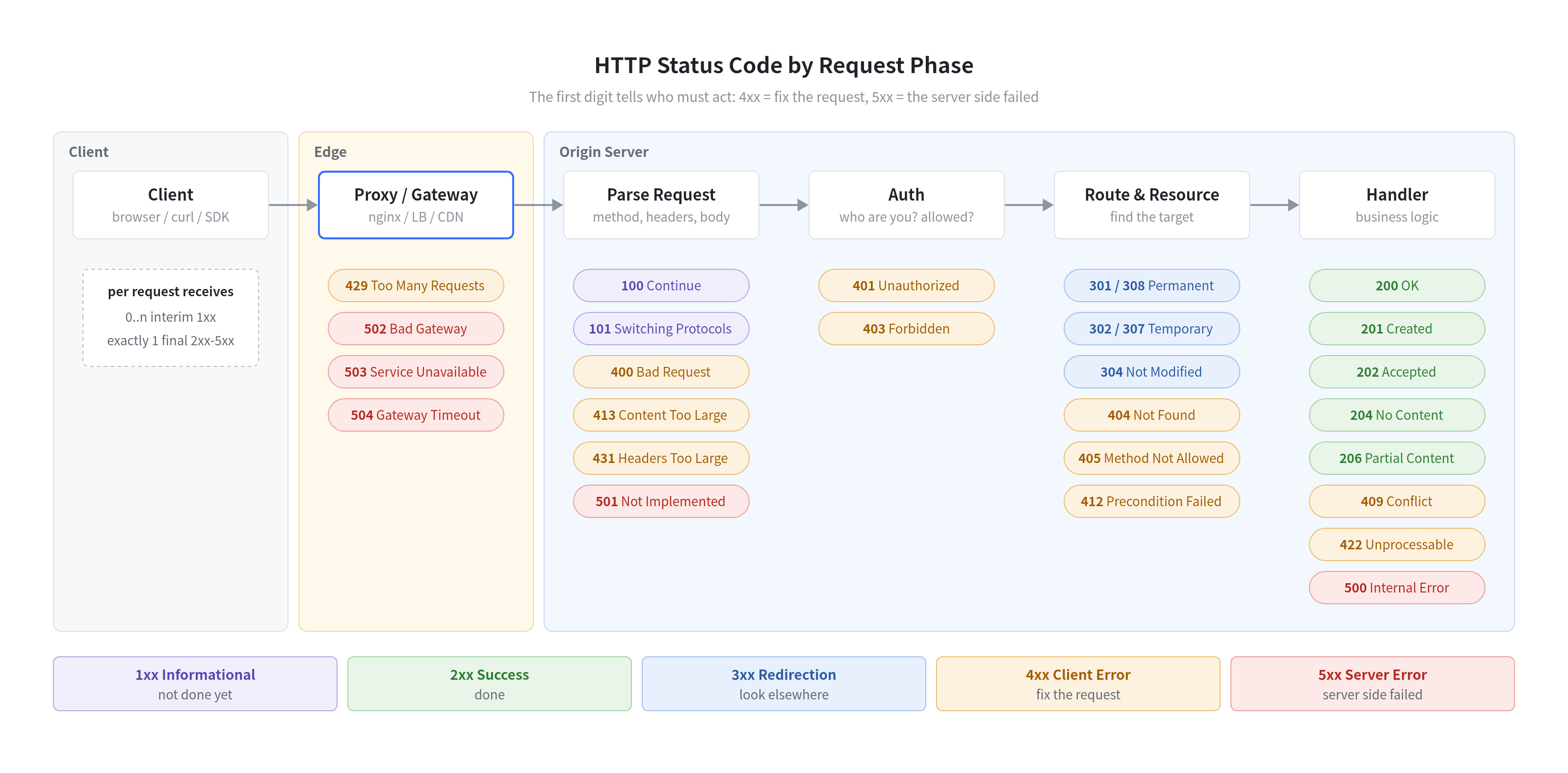
How to read it:
- Edge (nginx / load balancer / CDN): the request may never reach your app.
502/503/504here describe the proxy’s view of the upstream, and429comes from rate limiting. - Parse: a malformed or oversized request is rejected before any business code runs (
400,413,431). An unknown method gets501.100/101are sent here, once the headers have been read. - Auth: identity first (
401), then permission (403). - Route & Resource: is there something at this URL? (
404,405) Did it move? (3xx) Is the client’s cached copy still fresh? (304,412) - Handler: business logic either succeeds (
2xx), rejects the content (409,422), or crashes (500).
The code is a debugging hint. A
404means routing ran; a502means your app may never have seen the request.
5xx: Server Errors#
The server or something behind it failed. The request itself may be perfectly valid.
| Code | Name | Typical cause |
|---|---|---|
500 |
Internal Server Error | Unhandled exception, nil pointer, panic in a handler |
501 |
Not Implemented | Server doesn’t support the method at all (e.g. PROPFIND on a plain web server) |
502 |
Bad Gateway | Proxy got an invalid response from upstream: connection refused, reset, or garbage |
503 |
Service Unavailable | Overloaded, in maintenance, or deliberately shedding load |
504 |
Gateway Timeout | Proxy didn’t get a response from upstream in time |
505 |
HTTP Version Not Supported | e.g. a server that only speaks HTTP/1.x |
507 |
Insufficient Storage | WebDAV: the server can’t store the representation |
Gateway errors: 502 vs 503 vs 504 vs 499#
In production most 5xx are produced by a reverse proxy rather than by your app. The same “the site is down” can be very different failures:
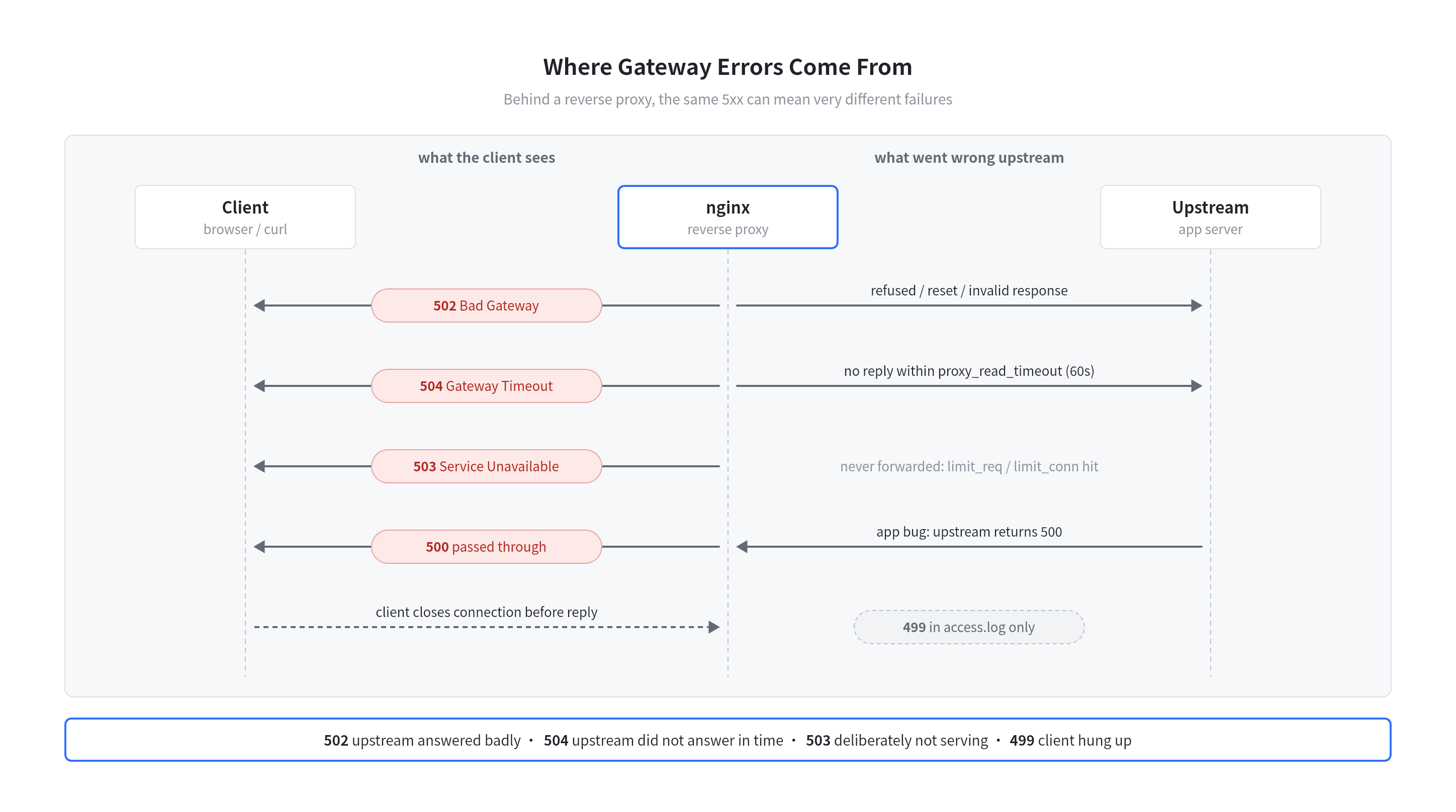
| You see | Where it failed | First thing to check |
|---|---|---|
502 |
nginx → upstream connection or response | Is the app process up? Port right? Did it crash mid-response? Logs: connect() failed (111: Connection refused), no live upstreams |
504 |
Upstream too slow | Slow query or downstream call. nginx proxy_read_timeout / proxy_connect_timeout default to 60s |
503 |
nginx itself, or the app shedding load | limit_req / limit_conn (their default reject status is 503), maintenance mode, app health checks |
500 |
Inside the app | Application logs and stack trace; nginx just passes it through |
499 |
Client gave up first | Not a real HTTP status, nginx only writes it to access.log. A spike usually means the upstream is slow and clients time out |
Retrying 5xx#
| Situation | Retry? |
|---|---|
503 / 429 with Retry-After: 120 |
Yes, after the given seconds (or HTTP date) |
502 / 503 / 504 on an idempotent method (GET, PUT, DELETE) |
Yes, with exponential backoff and jitter |
502 / 504 on POST |
Careful: the upstream may have already done the work (e.g. charged a card). Only retry with an idempotency key |
500 |
Usually no. A bug is deterministic, so the same request hits the same bug |
4xx: Client Errors#
The server understood the request and refuses it as sent. Retrying the same request gives the same result; the client has to change something first.
| Code | Name | When to use |
|---|---|---|
400 |
Bad Request | Malformed syntax: broken JSON, invalid header |
401 |
Unauthorized | No credentials, or bad ones. Must include WWW-Authenticate |
403 |
Forbidden | Known identity, but not allowed |
404 |
Not Found | Nothing at this URL (or the server hides that it exists) |
405 |
Method Not Allowed | e.g. DELETE /orders when only GET, POST exist. Must include Allow: GET, POST |
408 |
Request Timeout | Client was too slow to send the full request |
409 |
Conflict | Conflicts with current state: duplicate username, edit-version mismatch |
410 |
Gone | Removed on purpose and won’t come back |
412 |
Precondition Failed | If-Match: "v3" but the resource is now at "v4" (optimistic locking) |
413 |
Content Too Large | Body exceeds the limit, e.g. nginx client_max_body_size 1m |
415 |
Unsupported Media Type | Sent Content-Type: text/xml to a JSON-only API |
422 |
Unprocessable Content | Valid JSON, invalid meaning: {"age": -5} |
429 |
Too Many Requests | Rate limited. Should include Retry-After |
431 |
Request Header Fields Too Large | Oversized cookies or headers |
Common mix-ups#
| Pair | Difference |
|---|---|
401 vs 403 |
401 = “who are you?” (authentication; the name “Unauthorized” is misleading). 403 = “I know who you are, and no” (authorization). Logging in again fixes a 401, never a 403 |
403 vs 404 |
404 can hide that a resource exists. GitHub returns 404 for a private repo you can’t access |
404 vs 410 |
404 may be temporary; 410 tells crawlers and caches to drop the URL for good |
400 vs 422 |
400 = can’t parse it. 422 = parsed fine but fails validation |
409 vs 412 |
412 is the conditional-header (If-Match) version of a conflict; 409 is a business-rule conflict |
3xx: Redirection#
The target is somewhere else. The new address is in the Location header.
The redirect matrix#
Two questions pick the right code: is it permanent? and must the method and body be kept?
Method may change to GET |
Method & body preserved | |
|---|---|---|
| Permanent (clients and search engines update the link) | 301 Moved Permanently |
308 Permanent Redirect |
| Temporary (keep using the old URL) | 302 Found |
307 Temporary Redirect |
Temporary, always switch to GET |
303 See Other |
— |
Why are there five? Historically, browsers turned POST into GET when following 301/302, even though the spec didn’t say so. Instead of breaking the web, HTTP made that behaviour legal and added 307/308 for “keep the method”.
| Use case | Code |
|---|---|
http:// → https://, or a domain move |
301 (or 308 if it’s an API that receives POST) |
After a form POST, send the browser to a result page (Post/Redirect/Get) |
303 |
| Temporary maintenance page, A/B routing | 302 / 307 |
API endpoint moved and clients POST to it |
308 |
304 Not Modified: the cache validator#
304 isn’t really a redirect. It sends the client to its own cache. Dry run:
# 1st request: no cache
GET /logo.png
→ 200 OK
  ETag: "v1"
  Cache-Control: no-cache          (cache it, but revalidate before use)
  Content-Length: 48213            ← 48 KB transferred

# 2nd request: revalidate
GET /logo.png
If-None-Match: "v1"
→ 304 Not Modified
  ETag: "v1"
  (no body)                         ← ~0 KB transferred, browser uses cached copy

# after the logo changes
GET /logo.png
If-None-Match: "v1"
→ 200 OK
  ETag: "v2"                        ← new content, cache replaced
If-Modified-Since / Last-Modified work the same way with timestamps; ETag takes precedence when both are present.
2xx: Success#
| Code | Name | When to use | Key header |
|---|---|---|---|
200 |
OK | Default success with a body | — |
201 |
Created | POST /orders created a resource |
Location: /orders/42 |
202 |
Accepted | Queued for async processing; the work isn’t done yet | Often a Location to poll status |
204 |
No Content | Success, no body: DELETE, PUT with nothing to return |
— |
206 |
Partial Content | Answer to a Range request: resumable downloads, video seeking |
Content-Range |
206 dry run: resuming a 1000-byte download#
GET /video.mp4
Range: bytes=0-499
→ 206 Partial Content
  Content-Range: bytes 0-499/1000      ← first half, total size 1000
  Content-Length: 500

# connection drops, resume from byte 500
GET /video.mp4
Range: bytes=500-
→ 206 Partial Content
  Content-Range: bytes 500-999/1000
  Content-Length: 500
A range outside the file (bytes=2000-) gets 416 Range Not Satisfiable. A server that doesn’t support ranges just returns 200 with the whole file.
A
200with{"error": "..."}in the body is an anti-pattern. Proxies, caches, retry logic and monitoring dashboards only see200and count it as a success.
1xx: Informational#
Interim responses: “got it so far, the final answer is still coming.” A client must accept any number of them before the final response.
| Code | Name | Use |
|---|---|---|
100 |
Continue | Client asked Expect: 100-continue before uploading a large body; server says “go ahead” |
101 |
Switching Protocols | HTTP/1.1 Upgrade, e.g. to WebSocket. Not used in HTTP/2 (which uses extended CONNECT instead) |
103 |
Early Hints | Send Link: </app.css>; rel=preload while the server is still building the page, so the browser can start fetching early |
100 Continue: avoid uploading a body that will be rejected#
Client                                   Server
  │ POST /upload                            │
  │ Content-Length: 104857600   (100 MB)    │
  │ Expect: 100-continue                    │
  │ ───────── headers only ────────────▶    │  check auth, size limit...
  │                                         │
  │ ◀──────── 100 Continue ──────────────   │  OK: send the body
  │ ───────── 100 MB body ─────────────▶    │
  │ ◀──────── 201 Created ───────────────   │
  │                                         │
  │      or, if rejected up front:          │
  │ ◀──────── 413 Content Too Large ─────   │  100 MB never sent
curl adds Expect: 100-continue automatically for large uploads (over 1 MB in recent versions) and waits up to 1 second for the 100.
Hands-On Demo#
A minimal Go server that returns a representative code for each class:
package main

import (
	"log"
	"net/http"
)

func main() {
	// 201: resource created, Location points to it
	http.HandleFunc("/orders", func(w http.ResponseWriter, r *http.Request) {
		if r.Method != http.MethodPost {
			w.Header().Set("Allow", "POST")
			w.WriteHeader(http.StatusMethodNotAllowed) // 405
			return
		}
		w.Header().Set("Location", "/orders/42")
		w.WriteHeader(http.StatusCreated)
	})

	// 204: success, no body
	http.HandleFunc("/orders/42", func(w http.ResponseWriter, r *http.Request) {
		w.WriteHeader(http.StatusNoContent)
	})

	// 301: permanent redirect
	http.HandleFunc("/old", func(w http.ResponseWriter, r *http.Request) {
		http.Redirect(w, r, "/new", http.StatusMovedPermanently)
	})

	// 200 or 304 depending on If-None-Match
	http.HandleFunc("/logo", func(w http.ResponseWriter, r *http.Request) {
		etag := `"v1"`
		w.Header().Set("ETag", etag)
		if r.Header.Get("If-None-Match") == etag {
			w.WriteHeader(http.StatusNotModified)
			return
		}
		w.Write([]byte("logo-bytes"))
	})

	// 401: no credentials
	http.HandleFunc("/me", func(w http.ResponseWriter, r *http.Request) {
		if r.Header.Get("Authorization") == "" {
			w.Header().Set("WWW-Authenticate", `Bearer realm="demo"`)
			w.WriteHeader(http.StatusUnauthorized)
			return
		}
		w.Write([]byte("hello"))
	})

	// 429 and 503 both tell the client when to come back
	http.HandleFunc("/limited", func(w http.ResponseWriter, r *http.Request) {
		w.Header().Set("Retry-After", "30")
		w.WriteHeader(http.StatusTooManyRequests)
	})
	http.HandleFunc("/maintenance", func(w http.ResponseWriter, r *http.Request) {
		w.Header().Set("Retry-After", "120")
		w.WriteHeader(http.StatusServiceUnavailable)
	})

	// 500: unhandled error in business logic
	http.HandleFunc("/bug", func(w http.ResponseWriter, r *http.Request) {
		http.Error(w, "something broke", http.StatusInternalServerError)
	})

	// 206: ServeFile handles Range requests for us
	http.HandleFunc("/file", func(w http.ResponseWriter, r *http.Request) {
		http.ServeFile(w, r, "main.go")
	})

	log.Fatal(http.ListenAndServe(":8080", nil))
}
Run it with go run main.go, then in another terminal:
# print only the status code
curl -s -o /dev/null -w '%{http_code}\n' localhost:8080/orders            # 405
curl -s -o /dev/null -w '%{http_code}\n' -X POST localhost:8080/orders    # 201
curl -s -o /dev/null -w '%{http_code}\n' localhost:8080/nope              # 404 (default mux)
curl -s -o /dev/null -w '%{http_code}\n' localhost:8080/bug               # 500

# -i shows the status line and headers
curl -i localhost:8080/old                    # 301 + Location: /new
curl -i localhost:8080/me                     # 401 + WWW-Authenticate
curl -i localhost:8080/limited                # 429 + Retry-After: 30

# conditional request → 304
curl -i -H 'If-None-Match: "v1"' localhost:8080/logo

# range request → 206 + Content-Range: bytes 0-99/<size>
curl -i -H 'Range: bytes=0-99' localhost:8080/file

# watch the 100 Continue exchange (-v prints the interim response)
curl -v -X POST -H 'Expect: 100-continue' --data-binary @main.go localhost:8080/orders
The last command shows a detail of Go’s net/http: it sends 100 Continue only when the handler first reads r.Body. The /orders handler never reads the body, so the server skips the 100 and replies 201 straight away. That is valid: a server can answer with the final status without sending 100 first.
Cheat Sheet#
The codes you will actually meet in production:
| Code | One-liner | Who fixes it |
|---|---|---|
200 |
OK | — |
201 |
Created, see Location |
— |
204 |
OK, no body | — |
206 |
Here’s the range you asked for | — |
301 / 308 |
Moved for good | Update the link |
302 / 307 |
Temporarily elsewhere | — |
304 |
Your cache is still fresh | — |
400 |
Can’t parse your request | Client |
401 |
Who are you? | Client: log in / refresh token |
403 |
Not allowed | Client: get permission |
404 |
Nothing here | Client (or a broken deploy) |
429 |
Slow down | Client: back off, honour Retry-After |
500 |
App bug | Server |
502 |
Upstream broken / down | Server: app process, ports |
503 |
Not serving right now | Server: capacity, rate limits, maintenance |
504 |
Upstream too slow | Server: slow queries, timeouts |
499 |
(nginx) client hung up | Usually a slow server |
References#
- RFC 9110 §15: Status Codes — the current definition of all standard codes and their classes
- RFC 6585 — adds
428,429,431,511 - RFC 8297 —
103 Early Hints - RFC 9111: HTTP Caching — how
304and validators work with caches - IANA HTTP Status Code Registry — the official list of registered codes
- MDN: HTTP response status codes — practical per-code reference with browser behaviour
- nginx ngx_http_proxy_module —
proxy_read_timeout,proxy_next_upstreamand how 502/504 arise
Comments