Consul Overview
Background & Motivation#
In traditional infrastructure, applications communicated via static IP addresses and hardware load balancers. As architectures evolved into dynamic microservices and cloud-native environments (like Kubernetes or auto-scaling VM groups), IP addresses became ephemeral. Services could start, stop, or move at any time.
This created two major problems:
- Service Discovery: How do services find each other when IPs constantly change?
- Security & Routing: How do we secure communication (mTLS) and intelligently route traffic without hardcoding logic into every application?
HashiCorp introduced Consul to solve these challenges by providing a centralized registry and a unified control plane.
What Is It?#
Consul is a Service Networking Platform. It started primarily as a Raft-backed Service Discovery registry and Key-Value Store, and it has evolved to become a universal Control Plane for modern networks. The catalog and KV data are replicated through Consul servers, while reads can be tuned for stronger consistency or lower latency depending on the API/query mode.
It provides:
- Service Registry: A dynamic “phonebook” of all available services.
- Health Checking: Continuous monitoring that enables health-aware discovery, so clients, proxies, and load balancers can avoid unhealthy instances.
- KV Store: Distributed configuration storage.
- Service Mesh Control Plane: Centralized management of network policies and security.
Consul vs. Service Mesh#
A common misconception is that Consul alone is the whole Service Mesh. More precisely, Consul provides the service mesh control plane; the mesh also needs a data plane proxy to carry application traffic.
A complete Service Mesh requires two halves:
- Control Plane (The Brain): Manages routing rules, service registry, and certificate generation.
- Data Plane (The Muscle): The actual network proxies that intercept packets, encrypt them, and enforce rules.
Consul is the Control Plane. To implement a complete Service Mesh, you pair Consul with a Data Plane proxy, most commonly Envoy.
| Component | Responsibility | Examples |
|---|---|---|
| Control Plane | Policy, Discovery, Certs, Config | Consul, Istiod, Linkerd Control Plane |
| Data Plane | Application traffic handling, mTLS, L7 Routing | Envoy, Consul’s built-in proxy for development/testing, other integrated proxies |
Therefore, Consul + Envoy = a production-grade Consul service mesh.
Architecture & Detailed Deployment#
Deploying Consul correctly requires understanding its hierarchical architecture. It uses a client-server model.
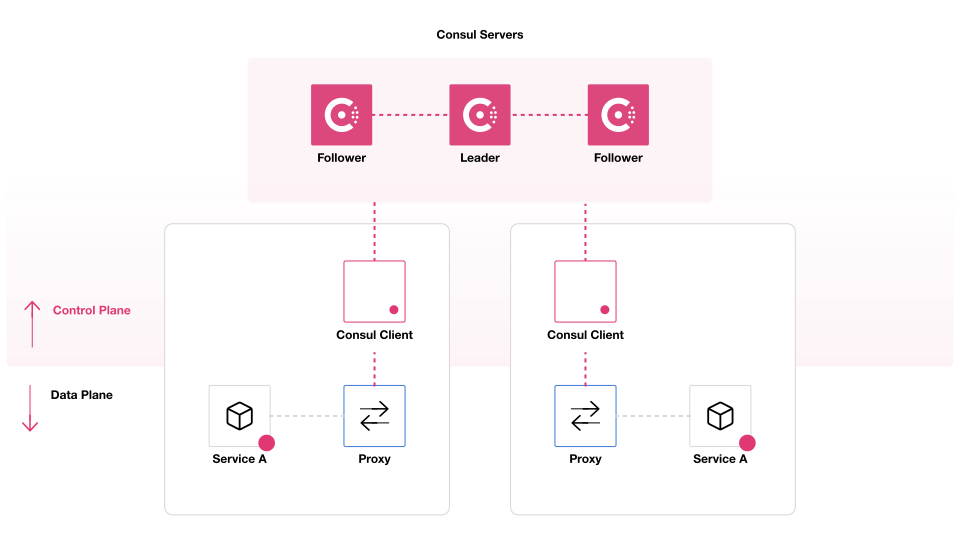
Source: HashiCorp Consul official architecture documentation.
What Components Get Deployed Together?#
When setting up a cluster, you deploy the following pieces:
| Component | Deployment Scale | Role |
|---|---|---|
| Consul Server | 3 or 5 per Datacenter | The “Brain”. Maintains the state (registry, KV) and handles leader election. Requires dedicated, stable VMs/Pods. |
| Consul Client | Usually 1 per Node/VM, or replaced by Consul Dataplane in some Kubernetes deployments | The “Edge”. Runs locally alongside apps. Forwards RPCs to servers, runs local health checks, and caches data. |
| Envoy Proxy | Usually 1 per service instance | The “Muscle”. Runs as a sidecar or dataplane proxy. Handles app traffic and enforces mTLS/routing. Configured by Consul through xDS. |
Note: The Consul Server and Client are the exact same binary (consul). Their role is simply determined by configuration (server: true|false).
Workflow & Component Communication#
Consul uses distinct protocols for different communication paths to maintain high availability and scale.
The Protocols#
- Gossip (Serf / TCP + UDP): Used for cluster membership and failure detection. Instead of servers pinging every client, nodes ping a random subset of neighbors. If a node dies, the gossip network propagates the failure rapidly.
- Consensus (Raft / TCP): Used only among Consul Servers to ensure the service registry and KV store are strongly consistent.
- RPC (TCP): Used by Clients to forward catalog, KV, and service registration operations to the Servers. DNS requests are received by the local agent, which may use RPC to resolve catalog data.
The Service Mesh Traffic Workflow#
How does App A talk to App B in a Consul Service Mesh?
- Configuration: The local Consul Client or Consul Dataplane talks to the Consul Servers to obtain service discovery data, leaf certificates, and policy/configuration such as Intentions.
- Proxy Setup: Envoy opens an xDS stream to the local Consul agent or Consul Dataplane endpoint. Consul serves dynamic listener, cluster, endpoint, certificate, and authorization configuration over that stream.
- Request: App A wants to call App B. In the common explicit-upstream model, it sends a plaintext HTTP request to a local Envoy listener such as
localhost:port. With transparent proxying enabled, iptables/eBPF rules can redirect traffic without changing the app’s destination address. - mTLS & Routing: Envoy uses its current xDS configuration to select an App B endpoint, encrypts the connection with mTLS, and sends it across the network to App B’s Envoy proxy.
- Delivery: App B’s Envoy proxy validates the peer certificate, enforces Intentions using Envoy filters, decrypts the traffic, and hands the plaintext request to App B.
Getting Started / Demo#
To see the basic service registry in action, here is a minimal docker-compose.yml to spin up a single Consul server and client (for local testing only, not production). This demo shows Consul discovery/health checks, not the full Envoy service mesh.
version: '3.8'

services:
  consul-server:
    image: hashicorp/consul:1.15
    command: "agent -server -bootstrap-expect=1 -node=server-1 -client=0.0.0.0"

  consul-client:
    image: hashicorp/consul:1.15
    command: "agent -node=client-1 -retry-join=consul-server -client=0.0.0.0 -ui"
    ports:
      - "8500:8500" # Local agent API + Web UI
    depends_on:
      - consul-server

  mock-app:
    image: hashicorp/http-echo:latest
    command: "-text='Hello from App A'"
    ports:
      - "5678:5678"
Once running, you can interact with the HTTP API exposed by the client agent:
# 1. Register a service via the Client agent
curl -X PUT -d '{
  "ID": "app-a",
  "Name": "mock-app",
  "Address": "mock-app",
  "Port": 5678,
  "Check": {
    "HTTP": "http://mock-app:5678/",
    "Interval": "10s"
  }
}' http://localhost:8500/v1/agent/service/register

# 2. Query healthy service instances
curl 'http://localhost:8500/v1/health/service/mock-app?passing' | jq .
Comments