File System
Architecture#
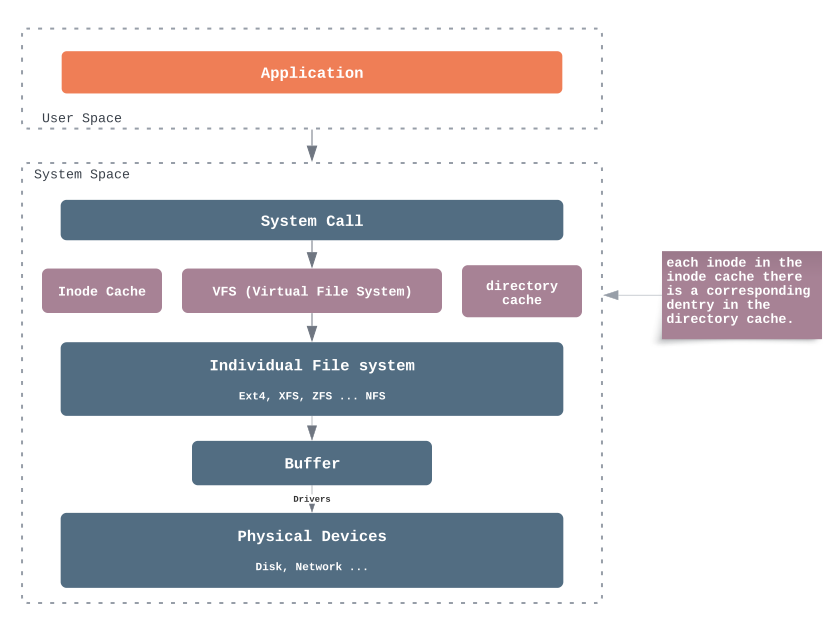
VFS#
The Virtual File System (also known as the Virtual Filesystem Switch) is the software layer in the kernel that provides the filesystem interface to userspace programs via system call. It also provides an abstraction within the kernel which allows different filesystem implementations to coexist.
A VFS specifies an interface (or a “contract”) between the kernel and a concrete file system. Therefore, it is easy to add support for new file system types to the kernel simply by fulfilling the contract.
VFS uses four core objects to model any filesystem. Together they answer four fundamental questions:
 "What filesystem is this?"       → Superblock   (one per mounted filesystem)
 "Where is this file?"            → Dentry       (one per path component, cached in memory)
 "What is this file?"             → Inode        (one per file/directory, metadata + disk block mapping)
 "How is this file being used?"   → File         (one per open(), per-process runtime state)
How they connect — example: read(fd, buf, 4096) on /home/user/file.txt
 Process fd table
 ┌──────────┐
 │ fd=3 ──────►  File Object       (open mode, offset=8192, ...)
 └──────────┘        │
                     ▼
                 Dentry             (name="file.txt", parent=dentry of "user")
                     │
                     ▼
                 Inode              (size, permissions, extent tree → disk blocks)
                     │
                     ▼
                 Disk blocks        (actual data)

 Superblock (block size=4096, filesystem type=ext4, ...)
     └── loaded at mount time, provides filesystem-wide parameters
         (block size, inode table location, free block bitmap, ...)
         NOT in the per-read data path, but consulted when locating inodes/blocks
| Object | Lives in | Lifecycle | One per |
|---|---|---|---|
| Superblock | Disk + memory | Mount → unmount | Mounted filesystem |
| Dentry | Memory only (LRU cache) | First lookup → evicted under memory pressure | Path component (/, home, user, file.txt) |
| Inode | Disk + memory | Created with file → deleted when unlink + no references |
File or directory |
| File | Memory only | open() → close() |
open() call (same file opened twice = 2 file objects) |
Block#
A block is the minimum allocation unit of the filesystem (typically 4KB). It bridges the gap between files (logical bytes) and disk sectors (512B hardware unit).
 File (logical bytes)  →  Blocks (4KB, filesystem unit)  →  Sectors (512B, disk unit)

 1 block = 8 sectors:
 ┌───────┬───────┬───────┬───────┬───────┬───────┬───────┬───────┐
 │sec 0  │sec 1  │sec 2  │sec 3  │sec 4  │sec 5  │sec 6  │sec 7  │
 └───────┴───────┴───────┴───────┴───────┴───────┴───────┴───────┘
 ◄─────────────────── 1 block (4096 bytes) ─────────────────────►
Even a 1-byte file consumes one full block (4KB) on disk:
$ stat workspace/main.go
  Size: 72         Blocks: 8        IO Block: 4096
#        ↑              ↑                ↑
#   actual bytes    512B sectors     block size
#   (72 bytes)      (8 × 512 = 4KB)  (1 block allocated, 4024 bytes wasted)
The block concept is referenced throughout the filesystem stack: Superblock records block size and counts, Inode maps file offsets to physical block numbers, Page Cache caches data in page-sized (= block-sized) units, and the Block Layer translates block I/O into sector I/O.
Superblock#
The superblock records various information about the enclosing filesystem, such as block counts, inode counts, supported features, maintenance information, and more.
Show the super block info in Linux:
all examples in this post are from my vps (OS: Ubuntu 22.04.2 LTS)
$ df -h
Filesystem      Size  Used Avail Use% Mounted on
tmpfs            96M  1.3M   95M   2% /run
/dev/vda1        24G   12G   11G  52% /
tmpfs           479M     0  479M   0% /dev/shm
tmpfs           5.0M     0  5.0M   0% /run/lock
tmpfs            96M  4.0K   96M   1% /run/user/0

$ dumpe2fs /dev/vda1
dumpe2fs 1.46.5 (30-Dec-2021)
Filesystem volume name:   <none>
Last mounted on:          /
Filesystem UUID:          cc673143-6902-4174-990e-8cba0304cb7a
Filesystem magic number:  0xEF53
Filesystem revision #:    1 (dynamic)
Filesystem features:      has_journal ext_attr resize_inode dir_index filetype needs_recovery extent 64bit flex_bg sparse_super large_file huge_file dir_nlink extra_isize metadata_csum
Filesystem flags:         signed_directory_hash
Default mount options:    user_xattr acl discard
Filesystem state:         clean
Errors behavior:          Continue
Filesystem OS type:       Linux
Inode count:              6537600
Block count:              6553339
Reserved block count:     327666
Free blocks:              3333553
Free inodes:              6325191
First block:              0
Block size:               4096
Fragment size:            4096
...
Source Code: super_block c source code
Directory Entry (Dentry)#
- Dentry is a runtime cache for pathname → inode lookup, purely in memory, no on-disk representation
- Built lazily on first access, not pre-computed at boot. Server restart = empty cache, rebuilt as files are accessed
- An individual dentry has a pointer to an inode and its parent dentry, forming a tree that mirrors the directory hierarchy
- Evicted under memory pressure using LRU
What’s on disk vs what dentry caches in memory:
# on disk: directory is a file, its data blocks store a (name → inode) table
$ ls -ia /home
 131073 .        2 ..   131074 user

# in memory: dentry caches the parsed result
#   dentry: name="user", inode=131074, parent=dentry("/home")
# this is what makes the second lookup instant — no need to read disk again
# check dentry cache stats
$ cat /proc/sys/fs/dentry-state
76935   58842   45   0   4724   0
#  ↑       ↑
# total   free (unused, reclaimable)

# check memory used by dentry cache (via kernel slab allocator)
# slabtop: display kernel slab cache information
#   -o : output once (no interactive mode)
$ slabtop -o | grep dentry
 94350   76935   81%    0.19K   4493       21     17972K dentry
Source Code: dentry c source code
Index Node#
- Index node(Inode) is a data structure that stores ownership, permissions, file size, and other metadata-related terms.
- They live either on the disc (for block device filesystems) or in the memory (for pseudo filesystems). Inodes that live on the disc are copied into the memory when required and changes to the inode are written back to disc.
- Every file and directory on Linux is represented by a unique inode number used by the system to identify it on the file system.
- Inode numbers are only unique within the same filesystem, not across filesystems. Different mounted filesystems (e.g., ext4, procfs, sysfs, tmpfs) each have their own independent inode numbering. For example,
/procand/syscan both have an inode1— they are completely unrelated inodes on different filesystems.
# ls
#   -i, --inode
#     print the index number of each file
$ ls -i workspace/main.go
1067025 workspace/main.go

$ ls -i workspace
1067025 main.go

# stat - display file or file system status
$ stat workspace/main.go
  File: workspace/main.go
  Size: 72              Blocks: 8          IO Block: 4096   regular file
Device: fc01h/64513d    Inode: 1067025     Links: 1
Access: (0644/-rw-r--r--)  Uid: (    0/    root)   Gid: (    0/    root)
Access: 2023-10-09 22:12:30.884848072 +0800
Modify: 2023-06-11 22:44:14.194331022 +0800
Change: 2023-06-11 22:44:14.194331022 +0800
 Birth: 2023-06-11 22:44:14.194331022 +0800

$ stat workspace
  File: workspace
  Size: 4096            Blocks: 8          IO Block: 4096   directory
Device: fc01h/64513d    Inode: 1066674     Links: 2
Access: (0755/drwxr-xr-x)  Uid: (    0/    root)   Gid: (    0/    root)
Access: 2023-10-09 22:12:33.196939026 +0800
Modify: 2023-10-09 22:12:32.612916118 +0800
Change: 2023-10-09 22:12:32.612916118 +0800
 Birth: 2023-06-11 22:43:01.453639583 +0800
Source Code: inode c source code
File#
- The file object is the in-memory representation of an open file.
- The file object is initialized with a pointer to the dentry and a set of file operation member functions which are taken from the inode data.
- The file structure is placed into the file descriptor table for the process.
- Reading, writing and closing files are done by using the userspace file descriptor to grab the appropriate file structure.
Source Code: file c source code
Deep Dive: How Files Are Located on Disk — step-by-step walkthrough with commands to demonstrate the full lookup process from pathname → inode → block group → extent tree → physical disk blocks.
Page Cache#
The page cache is the main disk cache used by the Linux kernel. It sits between VFS and the block layer, caching file data in memory using page-sized (4KB) units.
- Most
read()andwrite()calls go through the page cache — it’s the “buffer” between userspace and disk - On write: data is copied into the page cache and the page is marked dirty —
write()returns immediately without waiting for disk I/O - On read: if the data is already in the page cache (cache hit), it’s returned directly from memory — no disk I/O needed
- The kernel flushes dirty pages to disk asynchronously via writeback threads (
kworker/flush)
When do dirty pages get flushed to disk?#
| Trigger | Description |
|---|---|
| Periodic writeback | Kernel writeback threads run every ~5 seconds (dirty_writeback_centisecs = 500) |
| Dirty ratio threshold | When dirty pages exceed dirty_ratio (default 20% of available memory), block the writing process until pages are flushed |
| Dirty background ratio | When dirty pages exceed dirty_background_ratio (default 10% of available memory), writeback threads start flushing in the background |
Explicit fsync()/fdatasync() |
Application explicitly requests flush to disk — blocks until I/O completes |
| Memory pressure | When the system is running low on free memory, the kernel reclaims page cache pages |
# check page cache and dirty pages status
$ cat /proc/meminfo | grep -E "Cached|Dirty|Writeback"
Cached:           512340 kB   # total page cache size
Dirty:               148 kB   # pages waiting to be written to disk
Writeback:             0 kB   # pages currently being written to disk

# check writeback settings
$ sysctl vm.dirty_ratio
vm.dirty_ratio = 20
$ sysctl vm.dirty_background_ratio
vm.dirty_background_ratio = 10
$ sysctl vm.dirty_writeback_centisecs
vm.dirty_writeback_centisecs = 500

# drop page cache (for testing/troubleshooting only)
$ echo 1 > /proc/sys/vm/drop_caches  # free page cache
$ echo 2 > /proc/sys/vm/drop_caches  # free dentries and inodes
$ echo 3 > /proc/sys/vm/drop_caches  # free both
What if the server crashes before flush?#
Yes, dirty pages that haven’t been flushed to disk are lost. The page cache lives in RAM — a power failure or kernel panic means all dirty pages are gone.
 write() returns success          Server crashes here
       │                                │
       ▼                                ▼
 data in page cache (dirty)  ──────── LOST (never reached disk)
This is why databases never rely on the page cache alone for durability:
| Strategy | How it works | Used by |
|---|---|---|
WAL + fsync() |
Write to log file first, then fsync() to force to disk before acknowledging the transaction |
MySQL InnoDB, PostgreSQL |
WAL + O_DIRECT + fsync() |
Bypass page cache entirely, then fsync() — strongest guarantee |
MySQL InnoDB (innodb_flush_method = O_DIRECT) |
| Replication | Write to multiple nodes — even if one crashes, others have the data | HDFS (3 replicas), AWS S3 |
| Battery-backed write cache | Server hardware (RAID controller) has battery-backed RAM, data survives power loss in the controller cache | Enterprise storage |
Key takeaway:
write()returning success does NOT mean data is on disk — it only means data is in the page cache. Only afterfsync()returns success can you be certain the data has reached persistent storage.
Source Code: page cache (filemap.c)
Buffer vs Page Cache#
A disk stores two kinds of data: file content and filesystem metadata (the structural data that organizes and locates files). Linux caches them separately:
                    ┌──────────────────────────────────┐
                    │           Disk (/dev/vda1)        │
                    │                                  │
                    │  ┌───────────┐  ┌─────────────┐  │
                    │  │ Metadata  │  │File Content  │  │
                    │  │ (the map) │  │(the treasure)│  │
                    │  └─────┬─────┘  └──────┬──────┘  │
                    └────────┼───────────────┼─────────┘
                             │               │
                         cached by       cached by
                             │               │
                             ▼               ▼
                          Buffer        Page Cache
- Buffer caches filesystem metadata — the internal bookkeeping the kernel reads to locate files
- Page Cache caches file content — the actual bytes you read and write
What exactly is “metadata”?#
These are the VFS objects covered above — the stuff you never see as a user but the kernel accesses constantly:
| VFS Object | What’s cached in Buffer | When is it accessed |
|---|---|---|
| Superblock | Block size, inode table location, free block bitmap | mount, df, creating files |
| Inode | Size, permissions, extent tree (file offset → disk block#) | stat, ls -l, every read()/write() |
| Directory data block | (filename → inode#) table |
ls, cd, any path lookup |
A concrete example: cat /home/user/file.txt#
 ① lookup inode of "/"            → Buffer  (superblock, inode table)
 ② lookup "home" in "/"           → Buffer  (directory data block)
 ③ lookup "user" in "home"        → Buffer  (directory data block)
 ④ lookup "file.txt" in "user"    → Buffer  (directory block + inode)
 ⑤ inode extent tree → blocks [1024, 1025, 1026]
 ⑥ read blocks 1024-1026          → Page Cache (file content)
     │
     ▼
 copy_to_user() → terminal shows the content
Steps ①-⑤ are all buffer work (navigating the filesystem structure). Only step ⑥ is page cache work (the file content you actually see). For a small file, the kernel does more metadata I/O than content I/O — it’s just invisible to you.
Verify with free#
# clear caches
$ echo 3 > /proc/sys/vm/drop_caches && free
              total      used      free    buff/cache   available
Mem:         980508    183624    750000         46884      750000

# reading a FILE increases page cache
$ cat /var/log/syslog > /dev/null && free
              total      used      free    buff/cache   available
Mem:         980508    183624    700000         96884      750000

# reading raw BLOCK DEVICE increases buffer
$ dd if=/dev/vda1 of=/dev/null bs=1M count=64 && free
              total      used      free    buff/cache   available
Mem:         980508    183624    634000        162884      750000
Note: since Linux 2.4+, buffer is internally backed by page cache —
buffer_headstructs are metadata descriptors pointing into pages in the page cache. They are not separate memory pools, which is whyfreereports them together asbuff/cache. Thedrop_cachesinterface reflects this:echo 1drops page cache (file content),echo 2drops dentries + inodes (metadata/buffer),echo 3drops both.
I/O Modes#
Linux provides three different ways for applications to perform file I/O, each with different trade-offs:
1. Buffered I/O (default)#
All reads/writes go through the page cache. This is the default mode when you call read()/write().
Application buffer ──write()──► Page Cache ──writeback──► Disk
Application buffer ◄──read()─── Page Cache ◄──read I/O─── Disk
- Pros: fast (writes return immediately), kernel handles batching and readahead
- Cons: data copied twice (userspace → page cache → disk), dirty pages may be lost on power failure before flush
- Used by: most applications, Prometheus TSDB, RocksDB
2. Direct I/O (O_DIRECT)#
Bypasses the page cache entirely. Data is transferred directly between userspace buffer and disk.
Application buffer ──write()──────────────► Disk
Application buffer ◄──read()──────────────── Disk
- Pros: no double buffering, application has full control over caching
- Cons: application must manage its own cache, I/O must be aligned (typically 512B or 4KB)
- Used by: MySQL InnoDB (
innodb_flush_method = O_DIRECT), databases that manage their own buffer pool
# open file with O_DIRECT flag
# fd = open("/data/file", O_WRONLY | O_DIRECT);

# check if a process is using O_DIRECT via strace
$ strace -e openat -p <pid>
# look for O_DIRECT flag in openat() calls
3. Memory-Mapped I/O (mmap)#
Maps file content directly into the process’s virtual address space. Reads/writes become memory accesses.
Process Virtual Memory ──mapping──► Page Cache ──writeback──► Disk
        (load/store)                  (shared)
- Pros: no
read()/write()syscall overhead, multiple processes can share the same mapping - Cons: harder to control flush timing, page faults on first access, complex error handling
- Used by: Prometheus TSDB (reading block files), RocksDB (WAL via mmap optionally), log-structured systems
# check memory-mapped files for a process
$ cat /proc/<pid>/maps | head
# or
$ pmap <pid>
Comparison#
| Mode | Page Cache | Data Copies | Syscall per I/O | Alignment Required | Application Cache |
|---|---|---|---|---|---|
| Buffered | Yes | 2 (user↔cache↔disk) | Yes | No | No |
| O_DIRECT | No | 1 (user↔disk) | Yes | Yes | Yes (self-managed) |
| mmap | Yes | 1 (shared mapping) | No (page fault) | No | No |
Read Path#
What happens when an application calls read(fd, buf, count):
 Application: read(fd, buf, 4096)
       │
       ▼
 ① Syscall enters kernel
       │
       ▼
 ② VFS: resolve fd → file → dentry → inode
       │
       ▼
 ③ Page Cache lookup: is the page cached?
       │
    ┌──┴──┐
   Yes    No (cache miss)
    │      │
    │      ▼
    │  ④ Allocate new page in page cache
    │      │
    │      ▼
    │  ⑤ Submit read I/O to block layer
    │      │
    │      ▼
    │  ⑥ Block layer: create bio → I/O scheduler → device driver → disk
    │      │
    │      ▼
    │  ⑦ Data transferred from disk → page cache page
    │      │
    │      ▼
    │  ⑧ Readahead: kernel detects sequential pattern,
    │     prefetches upcoming pages (default ~128KB / 32 pages)
    │      │
    ├──────┘
    ▼
 ⑨ copy_to_user(): copy data from page cache → userspace buffer
       │
       ▼
 ⑩ Return bytes read to application
Readahead#
The kernel tracks access patterns per file. When it detects sequential reads, it prefetches upcoming pages before the application requests them, turning future reads into cache hits.
# check default readahead size (in 512-byte sectors)
$ blockdev --getra /dev/vda1
256    # 256 sectors = 128KB

# adjust readahead size (e.g., set to 1MB for sequential workloads)
$ blockdev --setra 2048 /dev/vda1  # 2048 sectors = 1MB
Source Code: readahead logic
Write Path#
What happens when an application calls write(fd, buf, count):
 Application: write(fd, buf, 4096)
       │
       ▼
 ① Syscall enters kernel
       │
       ▼
 ② VFS: resolve fd → file → dentry → inode
       │
       ▼
 ③ Page Cache: find or allocate page for this file offset
       │
       ▼
 ④ copy_from_user(): copy data from userspace buffer → page cache page
       │
       ▼
 ⑤ Mark page as DIRTY
       │
       ▼
 ⑥ Return bytes written to application ◄── write() returns HERE (fast!)
       │
       ... (asynchronous, later) ...
       │
       ▼
 ⑦ Writeback thread wakes up (periodic / threshold / fsync)
       │
       ▼
 ⑧ For each dirty page: create bio request
       │
       ▼
 ⑨ Block layer: I/O scheduler → merge/reorder → device driver
       │
       ▼
 ⑩ Data transferred from page cache → disk
       │
       ▼
 ⑪ Mark page as CLEAN
fsync() vs fdatasync()#
| Syscall | Flushes | Use Case |
|---|---|---|
fsync(fd) |
File data + all metadata (size, mtime, permissions, etc.) | When all metadata changes matter (e.g., file was extended) |
fdatasync(fd) |
File data + only metadata required to locate the data (e.g., file size if changed), skips non-essential metadata (e.g., mtime, atime) | Slightly faster for overwrites where size doesn’t change (e.g., database WAL) |
# trace write + fsync pattern (common in databases)
$ strace -e write,fsync,fdatasync -p <pid>
write(5, "..."..., 4096)        = 4096
fdatasync(5)                    = 0     # WAL flush
Block Layer#
The block layer sits between the filesystem/page cache and the device driver. It translates file-level I/O into disk-level I/O.
Core Concepts#
- bio (Block I/O): the basic unit of I/O in the block layer. A bio describes a single I/O operation: which disk, which sectors, which memory pages.
- request: one or more bios merged together. The I/O scheduler works with requests, not individual bios.
- I/O scheduler: reorders and merges requests to optimize disk access patterns.
 Page Cache (dirty pages / read requests)
       │
       ▼
 bio (block I/O descriptor)
       │
       ▼
 I/O Scheduler (merge, sort, prioritize)
       │
       ▼
 request queue
       │
       ▼
 Device Driver (e.g., virtio-blk, nvme, scsi)
       │
       ▼
 Disk (HDD / SSD)
I/O Schedulers#
Modern Linux (5.0+) uses multi-queue block layer (blk-mq) with these schedulers:
| Scheduler | Algorithm | Best For |
|---|---|---|
none |
No reordering, FIFO | NVMe SSDs (already fast random I/O, scheduler adds overhead) |
mq-deadline |
Deadline-based, prevents starvation | SSDs and HDDs with mixed read/write, databases |
bfq |
Budget Fair Queueing, per-process fairness | Desktop/interactive, multiple processes competing for I/O |
kyber |
Lightweight, latency-targeted | Fast SSDs with latency-sensitive workloads |
# find your device name first
$ lsblk
NAME    MAJ:MIN RM  SIZE RO TYPE MOUNTPOINTS
vda     252:0    0   25G  0 disk             # vda = virtio disk (KVM/QEMU VM)
├─vda1  252:1    0   25G  0 part /           # sda = SCSI/SATA disk (physical/VMware)
...                                          # nvme0n1 = NVMe SSD (physical/AWS nitro)

# check current I/O scheduler for a device (replace vda with your device)
$ cat /sys/block/vda/queue/scheduler
[mq-deadline] none

# change I/O scheduler (runtime)
$ echo none > /sys/block/vda/queue/scheduler

# check queue depth (how many requests can be in-flight)
$ cat /sys/block/vda/queue/nr_requests
256
Request Merge#
The block layer merges adjacent I/O requests to reduce the number of disk operations:
 Before merge:               After merge:
 ┌──────────┐                ┌──────────────────────────────┐
 │ write 4KB│ sector 100     │ write 12KB sector 100-111    │
 │ write 4KB│ sector 104     │ (single I/O request)         │
 │ write 4KB│ sector 108     └──────────────────────────────┘
 └──────────┘
 3 requests → 1 request
# check merge statistics
$ cat /sys/block/vda/stat
#   read I/Os  read merges  read sectors  read ticks  write I/Os  write merges ...
     38293      14172        995498        14105       344591      77498        ...
Source Code: block layer core, mq-deadline
Troubleshooting#
1. df & du#
# df displays the amount of disk space available on the file system containing each file name argument
$ df -h
Filesystem      Size  Used Avail Use% Mounted on
tmpfs            96M  1.3M   95M   2% /run
/dev/vda1        24G   12G   11G  52% /
tmpfs           479M     0  479M   0% /dev/shm
tmpfs           5.0M     0  5.0M   0% /run/lock
tmpfs            96M  4.0K   96M   1% /run/user/0

# du Summarize disk usage of the set of FILEs, recursively for directories.
/usr > du -h --max-depth=1 # display the usage of first depth in a human readable format
4.0K    ./lib32
32M     ./sbin
465M    ./src
4.0K    ./lib64
439M    ./share
...

# display the usage of this depth and sort the output in a human readable format
$ du -hs * | sort -rh | head -10
5.0G    usr
3.9G    var
2.4G    swapfile
1.1G    snap
...
2. iostat (device level)#
# Display a continuous device report of extended statistics at two second intervals.
# take note of the following statistics:
# - %util: percentage of elapsed time during which I/O requests were issued to the device
# - r/s, w/s: read/write requests per second for the device
# - rKB/s, rWB/s: the number of sectors (kilobytes, megabytes) read/write for the device per second
# - r_await, w_await: the average time (in milliseconds) for read/write requests issued to the device to be served. This includes the time spent by the requests in queue and the time spent servicing them.
$ iostat -x -d 2
Device            r/s     rkB/s   rrqm/s  %rrqm r_await rareq-sz     w/s     wkB/s   wrqm/s  %wrqm w_await wareq-sz     d/s     dkB/s   drqm/s  %drqm d_await dareq-sz     f/s f_await  aqu-sz  %util
loop0            0.00      0.02     0.00   0.00    0.29    47.11    0.00      0.00     0.00   0.00    0.00     0.00    0.00      0.00     0.00   0.00    0.00     0.00    0.00    0.00    0.00   0.00
loop1            0.00      0.00     0.00   0.00    0.14    34.80    0.00      0.00     0.00   0.00    0.00     0.00    0.00      0.00     0.00   0.00    0.00     0.00    0.00    0.00    0.00   0.00
sr0              0.00      0.00     0.00   0.00    0.00     0.12    0.00      0.00     0.00   0.00    0.00     0.00    0.00      0.00     0.00   0.00    0.00     0.00    0.00    0.00    0.00   0.00
vda              0.24      6.06     0.09  28.32    0.37    25.79    2.18     15.93     0.48  17.94    0.38     7.32    0.01      8.63     0.00   0.00    2.14  1258.27    0.20    0.14    0.00   0.10


Device            r/s     rkB/s   rrqm/s  %rrqm r_await rareq-sz     w/s     wkB/s   wrqm/s  %wrqm w_await wareq-sz     d/s     dkB/s   drqm/s  %drqm d_await dareq-sz     f/s f_await  aqu-sz  %util
loop0            0.00      0.00     0.00   0.00    0.00     0.00    0.00      0.00     0.00   0.00    0.00     0.00    0.00      0.00     0.00   0.00    0.00     0.00    0.00    0.00    0.00   0.00
loop1            0.00      0.00     0.00   0.00    0.00     0.00    0.00      0.00     0.00   0.00    0.00     0.00    0.00      0.00     0.00   0.00    0.00     0.00    0.00    0.00    0.00   0.00
sr0              0.00      0.00     0.00   0.00    0.00     0.00    0.00      0.00     0.00   0.00    0.00     0.00    0.00      0.00     0.00   0.00    0.00     0.00    0.00    0.00    0.00   0.00
vda              0.00      0.00     0.00   0.00    0.00     0.00    1.00     30.00     6.50  86.67    0.50    30.00    0.50      2.00     0.00   0.00    2.00     4.00    1.00    0.00    0.00   0.20
3. pidstat (process level)#
# pidstat - Report statistics for Linux tasks.
# -d report I/O statistics per second
$ pidstat -d 1
11:11:01 PM   UID       PID   kB_rd/s   kB_wr/s kB_ccwr/s iodelay  Command
11:11:01 PM     0       387      0.00     16.00      0.00       0  systemd-journal

11:11:01 PM   UID       PID   kB_rd/s   kB_wr/s kB_ccwr/s iodelay  Command
11:11:02 PM     0       387      0.00     36.00      0.00       0  systemd-journal

11:11:02 PM   UID       PID   kB_rd/s   kB_wr/s kB_ccwr/s iodelay  Command
11:11:03 PM     0       387      0.00     32.00      0.00       0  systemd-journal
11:11:03 PM     0       825      0.00      4.00      0.00       0  sshd

$ pidstat -d -p 387 1 # report I/O statistics for process 387 per second
11:11:24 PM   UID       PID   kB_rd/s   kB_wr/s kB_ccwr/s iodelay  Command
11:11:25 PM     0       387      0.00     16.00      0.00       0  systemd-journal
11:11:26 PM     0       387      0.00      0.00      0.00       0  systemd-journal
11:11:27 PM     0       387      0.00     32.00      0.00       0  systemd-journal
11:11:28 PM     0       387      0.00      0.00      0.00       0  systemd-journal
4. iotop#
# iotop - simple top-like I/O monitor
# NOTE: not handy as kernal config may need to update (at least the CONFIG_TASK_DELAY_ACCT, CONFIG_TASK_IO_ACCOUNTING, CON-FIG_TASKSTATS and CONFIG_VM_EVENT_COUNTERS options need to be enabled in your Linux kernel build configuration.)
$ iotop
Total DISK READ :       0.00 B/s | Total DISK WRITE :       7.85 K/s
Actual DISK READ:       0.00 B/s | Actual DISK WRITE:       0.00 B/s
  TID  PRIO  USER     DISK READ  DISK WRITE  SWAPIN     IO>    COMMAND
15055 be/3 root        0.00 B/s    7.85 K/s  0.00 %  0.00 % systemd-journald
5. strace#
# strace - trace system calls and signals
# process 654373 is a prometheus node exporter, through the strace (system calls), it's able to roughly understand how does node exporter work

$ strace -p 654373
...
newfstatat(AT_FDCWD, "/proc", {st_mode=S_IFDIR|0555, st_size=0, ...}, 0) = 0
statfs("/proc", {f_type=PROC_SUPER_MAGIC, f_bsize=4096, f_blocks=0, f_bfree=0, f_bavail=0, f_files=0, f_ffree=0, f_fsid={val=[0, 0]}, f_namelen=255, f_frsize=4096, f_flags=ST_VALID|ST_NOSUID|ST_NODEV|ST_NOEXEC|ST_RELATIME}) = 0
newfstatat(AT_FDCWD, "/proc/655152", {st_mode=S_IFDIR|0555, st_size=0, ...}, 0) = 0
openat(AT_FDCWD, "/proc/655152/stat", O_RDONLY|O_CLOEXEC) = 8
fcntl(8, F_GETFL)                       = 0x8000 (flags O_RDONLY|O_LARGEFILE)
fcntl(8, F_SETFL, O_RDONLY|O_NONBLOCK|O_LARGEFILE) = 0
epoll_ctl(4, EPOLL_CTL_ADD, 8, {events=EPOLLIN|EPOLLOUT|EPOLLRDHUP|EPOLLET, data={u32=1268860600, u64=139673605326520}}) = -1 EPERM (Operation not permitted)
fcntl(8, F_GETFL)                       = 0x8800 (flags O_RDONLY|O_NONBLOCK|O_LARGEFILE)
fcntl(8, F_SETFL, O_RDONLY|O_LARGEFILE) = 0
read(8, "655152 (node_exporter) R 655107 "..., 512) = 308
read(8, "", 204)                        = 0
close(8)                                = 0
openat(AT_FDCWD, "/proc/stat", O_RDONLY|O_CLOEXEC) = 8
fcntl(8, F_GETFL)                       = 0x8000 (flags O_RDONLY|O_LARGEFILE)
fcntl(8, F_SETFL, O_RDONLY|O_NONBLOCK|O_LARGEFILE) = 0
epoll_ctl(4, EPOLL_CTL_ADD, 8, {events=EPOLLIN|EPOLLOUT|EPOLLRDHUP|EPOLLET, data={u32=1268860600, u64=139673605326520}}) = 0
read(8, "cpu  773459 68488 441098 3776333"..., 512) = 512
...
6. lsof#
# lsof - lists on its standard output file information about files opened by processes
# An open file may be a regular file, a directory, a block special file, a character special file, an executing text reference, a library, a stream or a network file (Internet socket, NFS file or UNIX domain socket.)
# man lsof for more details
$ lsof -p 654373 # list all files opened by node exporter
COMMAND      PID USER   FD      TYPE   DEVICE SIZE/OFF     NODE NAME
node_expo 655152 root  cwd       DIR    252,1     4096  1046028 /root/workspace/node_exporter-1.6.1.linux-amd64
node_expo 655152 root  rtd       DIR    252,1     4096        2 /
node_expo 655152 root  txt       REG    252,1 20025119  1046289 /root/workspace/node_exporter-1.6.1.linux-amd64/node_exporter
node_expo 655152 root    0u      CHR    136,5      0t0        8 /dev/pts/5
node_expo 655152 root    1u      CHR    136,5      0t0        8 /dev/pts/5
node_expo 655152 root    2u      CHR    136,5      0t0        8 /dev/pts/5
node_expo 655152 root    3u     IPv6 10182875      0t0      TCP *:9100 (LISTEN)
node_expo 655152 root    4u  a_inode     0,14        0    12477 [eventpoll]
node_expo 655152 root    5r     FIFO     0,13      0t0 10182871 pipe
node_expo 655152 root    6w     FIFO     0,13      0t0 10182871 pipe
Linux Storage Stack#
 https://www.thomas-krenn.com/en/wiki/Linux_Storage_Stack_Diagram